
A reference implementation: AI voice and chat for a clinic contact center
A note before this one: the clinic itself is a composite, not a named client — the same recurring pattern we see (a contact center only reachable when staff are free), written up as a technical walkthrough. What’s changed since we first published this: we’ve now built the underlying system for real, end to end — a real Telnyx phone number, a real scheduling backend, real test calls — rather than describing what we’d design. The business scenario below is illustrative; the engineering isn’t. Costs and containment-rate figures are still illustrative, since there’s no real clinic’s call volume behind them yet.
The problem
A clinic contact center, staffed during business hours, handling appointment bookings, rescheduling, and a long tail of basic questions — opening hours, whether a referral is needed, what to bring to a first appointment. The problem wasn’t call volume, it was availability: staff were busy with in-person patients or simply not there outside a narrow window, so a meaningful share of calls and chats went unanswered or abandoned. The brief was an AI voice and chat assistant, available around the clock, natural enough to feel like talking to a person — with a human always reachable for anything the assistant shouldn’t handle alone.
Start with measurement, not a build
Before recommending anything, we measured the thing we were trying to fix. One week of the existing contact center: calls received, calls answered, average time to answer, chat messages received and response times, and a rough tag of what each contact was actually about (booking, rescheduling, a basic question, something clinical). That gave us two things a demo never would: a real baseline to measure against later, and a breakdown of which contact types were actually routine enough to automate — which turned out to be the majority, but not all, of the volume.
The recommendation that came out of it wasn’t “automate the contact center.” It was narrower: automate booking, rescheduling, and the basic-question long tail; escalate everything clinical, ambiguous, or emotionally charged straight to a person; and keep a human able to see and step into any AI conversation while trust in the system was still being built.
The architecture, as built
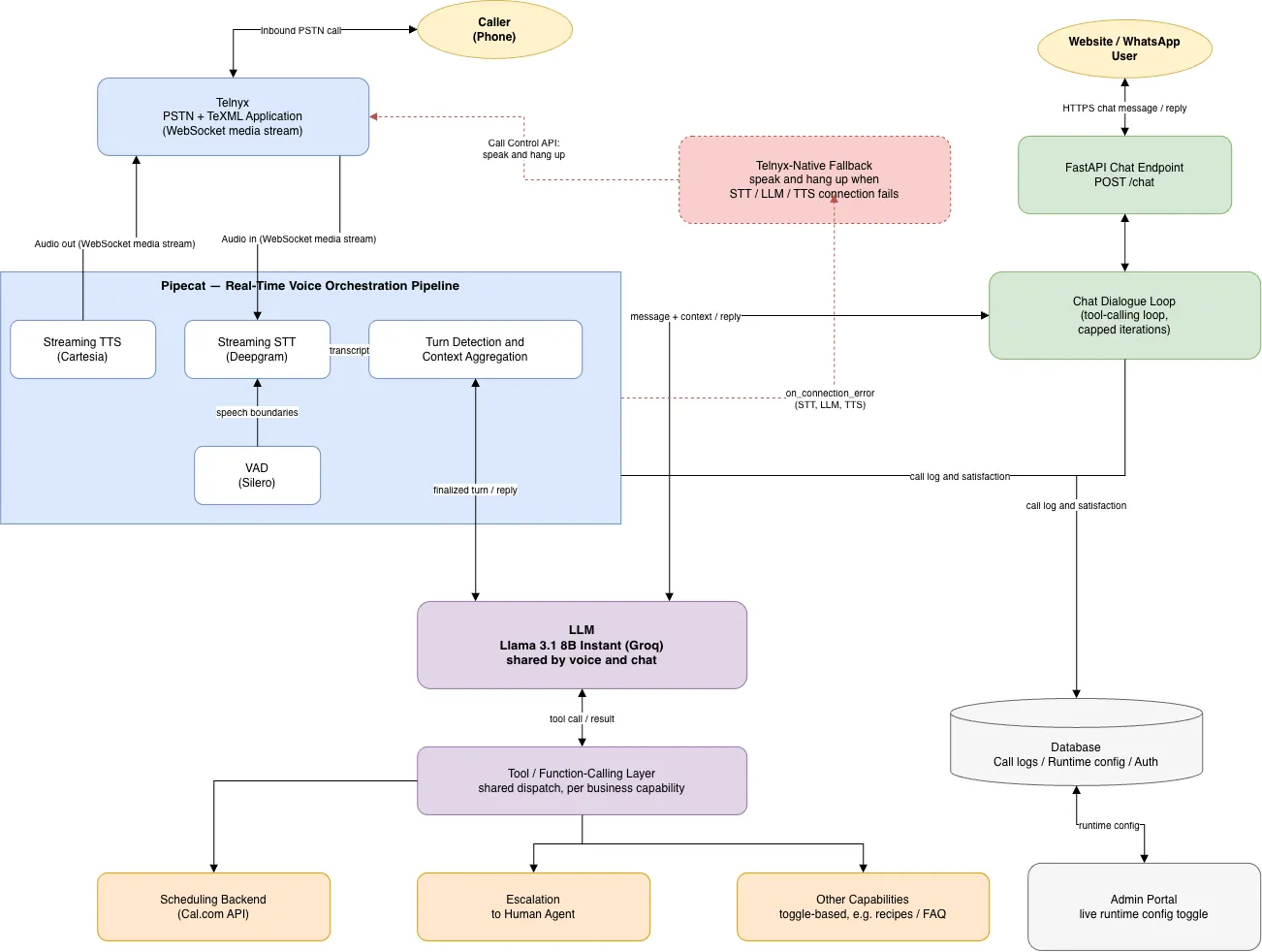
One structural decision worth calling out: we didn’t build this clinic-specific. Business name, services, hours, scope boundary, and which capabilities are even switched on (scheduling, FAQ, others) are all configuration, not code — the same assistant runs for a clinic, a bank branch, or a restaurant by changing what it’s told, not by forking the project. We proved this wasn’t just a nice idea by wiring in a second, entirely unrelated capability (recipe lookups against a public database, for a different demo scenario) through the same toggle mechanism, with zero changes to the scheduling logic or the voice pipeline underneath. If your business doesn’t look exactly like a clinic, that’s the point — the architecture doesn’t assume it does.
A few tooling decisions worth explaining rather than just listing:
Telnyx for the PSTN/telephony layer, rather than the more commonly-reached-for Twilio. Same integration shape — WebSocket media streaming that plugs into Pipecat the same way — but a lower per-minute cost and a real-time media API built with voice-AI latency in mind rather than bolted onto older infrastructure. One real gotcha worth flagging for anyone doing this themselves: Telnyx has more than one “voice application” type in its dashboard, and only a TeXML Application — not a plain Call Control app — actually delivers the media stream Pipecat expects. Getting that wrong looks like nothing happening at all, with no obvious error pointing at the cause.
Llama 3.1 8B Instant, hosted on Groq as the dialogue model. Small on purpose. This isn’t a reasoning-heavy task — it’s structured: understand the request, fill in the slots (which service, which day, morning or afternoon), call the right tool, confirm back to the caller. An 8B model handles that reliably when the task is scoped tightly and the tools are well-defined, at a fraction of the latency and cost of routing every turn through a frontier model — and Groq’s inference is fast enough that a small model’s speed advantage actually shows up as a shorter pause before the assistant answers, not just a lower bill. The tradeoff is real: it’s noticeably weaker at handling ambiguity or anything outside the scripted flow, which is precisely why narrow scope plus a clean escalation path matters more than model size here. Self-hosting the same class of model remains the right call once volume justifies owning the infrastructure — we started hosted deliberately, to validate the product before optimising its cost.
Pipecat for orchestration. This is the part that actually makes a voice bot feel natural rather than walkie-talkie-like: managing turn-taking, detecting when the caller has actually finished speaking versus paused, handling interruptions (a caller talking over the assistant), and keeping the STT → LLM → TTS round trip fast enough that the pause before a response doesn’t feel like a hold queue. We’ve written a companion technical piece on exactly how that pipeline is put together, for anyone evaluating it for their own build.
Deepgram for streaming STT, over batch Whisper. Standard Whisper is a batch model — you get a transcript after a chunk of audio finishes, which adds latency that’s noticeable on a live call. For real-time voice, a streaming ASR service is the right category of tool, and the accuracy that matters is against real phone audio, not clean sample recordings — 8kHz PSTN audio with background noise is meaningfully harder than a studio clip, and that gap only shows up once you’re testing with a real phone.
Cartesia for TTS. Modern low-latency TTS is genuinely hard to distinguish from a human on a phone line, which is exactly what raises the next issue — and, as it turned out mid-project, exactly why you need a plan for what happens when your TTS provider itself has a bad day. More on that below.
What broke, and what we learned fixing it
This is the section a hypothetical write-up can’t have. Every one of these was found on a real test call, not caught in review beforehand — which is itself the point: a system that looks right in isolation and a system that behaves right on a live call are different claims, and only one of them is testable without picking up a phone.
- The assistant didn’t know what day it was. Nothing in the system prompt stated the current date, so it had to guess when resolving “tomorrow” or “next Monday” — and routinely guessed wrong, correctly reporting zero availability for the wrong day. Not a scheduling-integration bug; the integration was right. The fix was one line — state today’s date explicitly, computed fresh per call rather than cached at process start — but finding it required a real call, because nothing about the flow looked broken from the outside.
- Silence during a lookup reads as a dead phone, not “still working.” The first time the assistant checked real availability against a live scheduling system, the round trip took long enough that the caller heard nothing at all in the gap. People don’t wait patiently through silence on a phone the way they might watch a spinner on a screen. The fix was a short spoken filler — “let me check that for you” — queued the instant a lookup starts, playing while the real request is still in flight.
- A tool doing exactly what it should still needs to be told how to talk about it.
check_availabilitycorrectly returns every open slot for a day — that’s the right contract. Left alone, the assistant read the entire list aloud. No receptionist does that. It needed to be told, explicitly, to ask what time the caller had in mind first, and only offer a couple of spread-out options if they had no preference. - A model will happily narrate its own machinery if nothing tells it not to. Twice, in fact: first it read raw internal identifiers out loud instead of a dish or appointment name (a debugging-only field leaking into speech), and after that specific case was fixed, it started narrating its own tool calls in something close to pseudocode — “let me check underscore availability” — a broader version of the same failure the narrower fix hadn’t covered. The general lesson: a small model treats anything in its context as fair game to say out loud unless explicitly told certain things are for its own bookkeeping, never for the caller.
- A setting that exists in the code isn’t the same as a setting that’s actually deployed. A new capability was added to the code and its example configuration, and simply didn’t take effect — because the live environment’s real configuration file was never updated to match. Obvious in hindsight; invisible until someone actually flips the switch and nothing happens. Worth a deployment checklist, not just a code review, for exactly this reason.
- Wrapping up a call needs the same care as starting one. Early on, the assistant would finish helping and then just… wait, indefinitely, until the caller hung up themselves. Now it asks if there’s anything else, and once a caller confirms they’re done, it says a proper goodbye and ends the call itself — which sounds like a small thing until you’re the one sitting on a call that never ends.
- A vendor outage will happen, and “the assistant says nothing” is the worst possible failure mode. Mid-project, our TTS provider’s account hit a billing problem and started rejecting every connection. The caller heard the call connect, then complete silence — because the only channel the system had for telling anyone anything was the exact component that had just broken. The fix was a fallback that doesn’t depend on the primary voice pipeline at all: if speech-to-text, the model, or text-to-speech fails to connect, the assistant falls back to the telephony provider’s own built-in announcement capability to apologise and hang up cleanly, independent of whichever upstream vendor is actually down. And that fallback had its own bug on the very first real test — it hung up before saying anything, because the announcement command is asynchronous and doesn’t wait for playback to finish — caught and fixed the same day, on a real call.
None of these are exotic failures. They’re the specific, boring kind that only shows up once a real caller (or a caller-shaped test) hits the system, and they’re exactly why “we tested it internally” and “we ran it against a real phone line” are different levels of confidence to be offering a client.
Other implementation challenges
- “Indistinguishable from a person” runs straight into disclosure obligations. The EU AI Act requires informing users when they’re interacting with an AI system unless it’s obvious from context — and on a phone call, it usually isn’t obvious. We didn’t fight this; we designed a brief, natural disclosure into the greeting (“Hi, you’re speaking with [Clinic]’s assistant — I can help with bookings and quick questions, and I’ll bring in a team member for anything else”) and found it didn’t meaningfully change how people used it. Fighting the requirement would have been the wrong hill.
- An 8B model is fast and cheap, and it will confidently misunderstand things outside its scope. Relative dates (“the Tuesday after next”), compound requests, and anything ambiguous need either tight slot-filling prompts and confirmation steps, or a fast handoff — not a bigger model as the first fix.
- The clinic’s scheduling system had no clean API — a common story with practice-management software. A meaningful share of the integration work was making that system reliably scriptable at all, not the AI layer on top of it. We validated the integration directly against a live scheduling account before trusting it — including two real doc-vs-reality mismatches (a required field the documentation listed as optional, and an email-domain validation quirk) that only surfaced by actually calling the API, not by reading about it.
- Staff were, reasonably, worried about being replaced. The framing that worked was positioning the assistant as absorbing overflow and after-hours volume — the calls that were previously going unanswered — rather than replacing the people handling the ones that came through during business hours. Getting reception staff involved in defining the escalation rules made them co-owners of where the line sits, not just spectators.
- Scope creep pressure, post-launch. Once it worked well for booking, the natural next ask was “can it also answer questions about symptoms.” That’s exactly the line we’d drawn on purpose — logistics and administration, not clinical judgment — and held.
Cost structure
Illustrative, not a quote — the real shape of it is what matters:
- Telephony: per-minute PSTN cost through Telnyx, scales directly with call volume.
- Inference: an 8B-class model is small enough to self-host cost-effectively on modest GPU infrastructure at real call volumes, rather than paying per-token to a hosted frontier model for every turn of every call — a deliberate cost decision we now have real per-call instrumentation to make with actual data, not a guess.
- STT/TTS: usage-based, typically per-minute or per-character — and, as above, worth budgeting for a fallback path that has to work even when the primary vendor doesn’t.
- One-time: integration work (dialogue design, tool/API integration with the scheduling system, testing against real call audio, and — now proven necessary — testing against real failure modes) — the majority of total project cost, as it usually is.
- Ongoing: monitoring, evaluation, and iterating on the escalation rules as real usage reveals edge cases the initial design didn’t anticipate.
At meaningful call volume, the ongoing cost per contact handled by the assistant runs well below the cost of a human-handled contact — but the comparison that actually matters isn’t cost-per-contact, it’s the contacts that were previously going unanswered entirely.
Current state, in this scenario
Voice and chat both live, handling the bulk of routine booking and FAQ volume, with a real end-to-end test call confirmed working — webhook through to the caller hearing a natural reply and the interaction logged with an inferred satisfaction rating. Human oversight — a live view into AI conversations with the ability to step in — is still on, tapering as confidence in the escalation rules builds rather than being switched off on a fixed schedule. Clinical questions and anything ambiguous still escalate directly, by design.
Illustrative KPIs
The kind of metrics that actually matter here, with illustrative ranges for a deployment like this:
- Availability: business hours only → 24/7.
- Containment rate: roughly 60–70% of routine contacts (booking, rescheduling, basic questions) resolved without a human, in line with the baseline week’s breakdown of contact types.
- Abandoned/missed contact rate: meaningfully down, since the assistant answers immediately rather than a caller hitting a busy line and giving up.
- Time to first response: from minutes-to-hours (voicemail, callback queues) down to immediate.
- Escalation resolution: full conversation context passed to the human agent, rather than the caller re-explaining from scratch.
Benefits and cost savings
Beyond round-the-clock availability:
- Fewer no-shows, from automated appointment confirmations and reminders the assistant can send without anyone having to remember to.
- Freed-up staff time — routine bookings and repeat questions stop competing with in-person patients and genuinely complex calls for the same attention.
- Consistent answers. The assistant doesn’t have an off day or give five different staff members’ five different phrasings of the same policy.
- Captured demand that was previously lost — every answered call that would otherwise have been abandoned is a booking that didn’t have to be won back later.
- No need to staff for peak — Monday-morning call spikes get handled without overstaffing the rest of the week to cover them.
What’s next on the roadmap
- Widening the assistant’s scope from booking into pre-visit intake questionnaires, once the current scope has enough real usage data to justify it.
- Proactive outreach — reminders and post-visit check-ins — not just inbound handling.
- A proper observability dashboard for staff, replacing ad hoc spot-checking with a real view into what the assistant is handling and where it’s escalating.
- Revisiting the model choice once there’s enough evaluation data to know specifically where an 8B model’s limits are actually being hit, rather than upgrading speculatively.
- Confirming the vendor-outage fallback against more failure types than the one that’s actually happened so far.
This is the same discipline as the delivery model itself — measure first, scope deliberately, keep a human in the loop where it matters, and let real usage data decide what happens next rather than guessing upfront.
Get in touch if something like this is on your roadmap.