
An HR agent that knows when not to decide
Leave requests look like an easy thing to automate. Someone asks for two days off; check their balance, check the calendar, say yes or no. In practice, the decision needs things no form captures. Can the workshop cope that week? Who takes over this person’s jobs? Is the colleague who normally covers for them on leave as well? What did the employee actually write in that little description box?
A car repair shop asked us exactly that: could an AI agent take leave requests off their managers’ desks without becoming a liability? Before setting anything up in their business, we built a proof of concept: the same kind of workshop, with a director, a workshop manager, two foremen, five mechanics, a body technician and a service advisor, running on open-source Odoo. This post covers what we built, the design decisions that mattered, and the parts we got wrong first.
The short version: the AI was the easy part. Deciding what the agent may decide on its own, and making sure people stay in charge of everything else, was the real work.
The setup
Everything runs on open-source components:
- Odoo 19 Community for employees, Time Off and invoicing, with an open-source repair-shop module for repair orders, quotations and work orders.
- Our own additions for what a workshop needs on top: mechanics’ skills, a designated shadow who covers for each person, and a workshop load figure that shows, per skill and per day, how much of the available time is already booked.
- The agent itself, running alongside Odoo and working only through its official interface.
- An AI gateway (LiteLLM) between the agent and the model, so every AI call is controlled and logged. During development the model was a small open-source model running locally. Nothing left the building.
The proof of concept runs on a fictitious workshop with synthetic employees and customers, so no real personal data was involved. The data is not toy data, though: eight weeks of planned work, a quiet week, a crunch week (a fleet contract on top of the seasonal tyre and brake rush), four weeks of finished jobs with real logged hours, quotations, invoices and payments. It’s shaped like the shop we’re building it for.
Rule one: the rules decide, the AI recommends
The first decision shaped everything else. The AI never approves or refuses anything. A deterministic policy does, and it’s ordinary code with a unit test for every branch:
- Is there enough leave left?
- Did the employee give enough notice?
- Would any of their skills go into the red if they’re away, on top of the leave already approved?
- Is their shadow available (not on leave, not overbooked)?
- Can someone available take over each of their open work orders?
If every rule passes, the agent approves, hands the work orders to the shadow, and writes a note on the request listing each rule with a ✅ or ❌. If a rule fails, it refuses with the same list, plus up to three quieter periods when the request would pass.
The AI model reads the same facts and gives a recommendation with its reasons. It can’t overrule the rules. But when the rules say yes and the model hesitates, or recommends otherwise, the request goes to the employee’s foreman instead of being approved. In other words, the model can make the agent more careful, never less.
Some requests the agent doesn’t decide at all. Leave for foremen and above always goes to a person, with a brief: balance, history, who covers, what the rules would say, and the AI’s assessment. Sick leave is always approved, and the agent’s job there is the aftermath: telling the foreman what the absence does to the workshop.
This matters beyond engineering taste. Under the GDPR, a refusal by an automated system is a decision with an effect on the employee (Article 22). Every refusal states its reasons in plain language, and anyone can ask for a person to look at it.
Realistic data found our design mistakes
Our first demo data was wrong in a way that took a while to see. Most mechanics have more than one skill, and the way we filled the schedule booked every one of them past a full day, on every normal day. As a result, every request failed the shadow check (“Sven is overbooked”), and we had started to design around that.
It even led us to the wrong policy. With overbooked data, judging a request “as if the employee were away” turned nearly every week red, so we decided the agent shouldn’t do that. Once the data was realistic, that same check became exactly right: it answers can the workshop absorb this absence?
The lesson: an agent is only as good as the data you tested it on. Unrealistic demo data doesn’t just make a demo look odd; it hides design errors, and sometimes creates them.
People decide in the tools they already use
When the agent hands a decision to a person, that person shouldn’t need a new app. Everything happens inside Odoo:
- The brief lands in the chatter of the leave request, with a to-do for the approver.
- The approver approves or refuses in Time Off as usual. The agent picks up the decision and hands over the work orders.
- Waiting decisions are saved, so a restart loses nothing. We tested this deliberately: stop the agent, approve as the manager, start the agent again. It picked up the decision and finished the job.
- An Agent Console inside Odoo shows every run: the agent’s steps as a flow diagram, live while it runs, with each step explained in plain language. You can see which rule decided, what the AI recommended, and what the workshop load looked like.
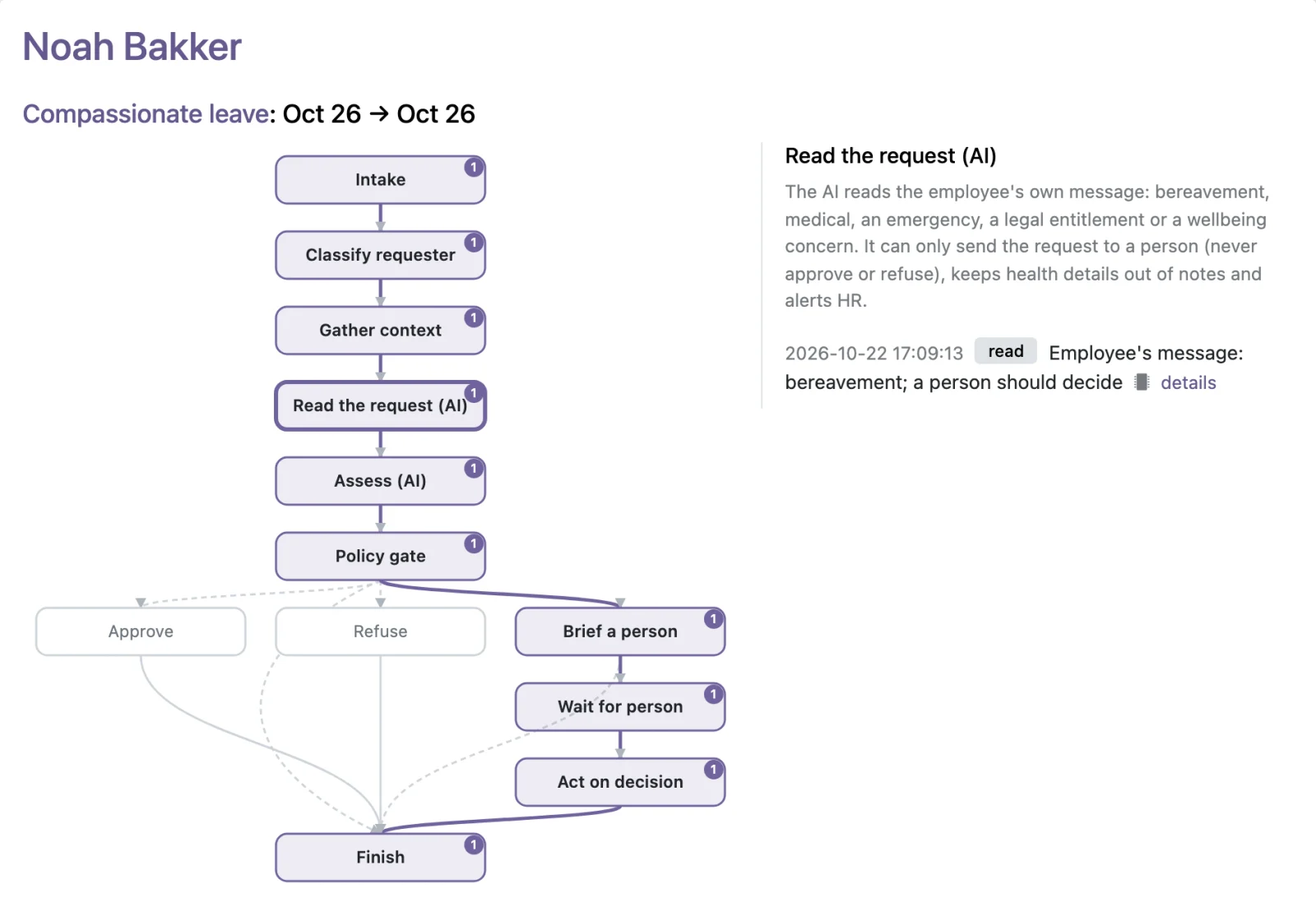
One run in the Agent Console. A mechanic booked annual leave for a funeral at two days’ notice. The rules alone would have refused it. The AI read the message, the policy sent the request to the foreman, and the foreman approved it as compassionate leave. The highlighted path shows each step it took; in the console, clicking a step shows what happened there. (Click the image to enlarge it.)
One surprise came from Odoo’s own permissions. A foreman can’t see their mechanics’ leave requests. Odoo shows a request only to the employee, its approver and HR. Since the agent is the approver for mechanics, the foremen it escalated to couldn’t open the requests they were meant to decide. We only found out by logging in as the foreman, after the workshop’s director had already decided a request in their place. Escalated requests now appear for the foreman under Time Off › Escalated to Me, with buttons to decide them.
The lesson: test every flow logged in as each role, not as the administrator. The host system’s permission model decides where people can actually act.
When the workshop runs short
Sick leave is always approved, but it can leave the workshop short. When one of the brakes mechanics calls in sick in the crunch week, the brake work that’s booked is suddenly far more than the people left can do.
So when approved sick leave pushes a skill into the red, or leaves work nobody can take over, the agent opens a temporary staffing request for the workshop manager. It shows how short the workshop is, which jobs have nobody to do them, and what temporary help would roughly cost. Because nobody knows how long sick leave will last, the request stays open and is reviewed, rather than being opened again every time the sickness continues.
This is the kind of follow-up that normally depends on someone remembering it on a busy Monday.
The AI step we threw away
Our first version had a second AI model review the first model’s text before it was posted: are its reasons supported by the facts, free of speculation about health, and respectfully worded? We built it properly, with a calibration set of statements with known answers. It caught real mistakes, including the model getting a number subtly wrong.
Then we asked whether it was worth it, and it wasn’t. The decision and its explanation came from the rules; the AI’s text was commentary on top. The reviewer cost a lot of time and memory on every request to protect the least important part of the output. On a laptop, running it next to everything else made the whole machine crawl.
The question we should have asked first was where the structured rules are blind. They decide on balance, dates and workshop load. They never read what the employee wrote, and that’s where the real risk was. A mechanic who writes “my father passed away, the funeral is on Thursday” at two days’ notice got refused on the notice rule. Automatically. Possibly against the law: in the Netherlands, employees are entitled to short emergency leave (calamiteitenverlof), and sector agreements often grant leave for funerals.
So we replaced the reviewer with a step that reads the employee’s message before the rules decide:
- The model classifies the message: bereavement, own medical treatment, a family emergency, a legal entitlement (for example their own wedding), a wellbeing concern, or none of these.
- The AI can only send a request to a person. Any recognised circumstance turns an automatic refusal into a decision by the foreman. So does a message the model couldn’t read: the agent never refuses on a guess. Ordinary reasons (“holiday in Spain”, “moving house”) change nothing.
- Health and private details stay out of the notes and briefs colleagues read. The brief names the kind of circumstance, not the details.
- A possible wellbeing concern, such as “I can’t cope with the pressure anymore”, sends a confidential to-do to HR rather than to the foreman.
- The right leave type. We added the types this calls for: compassionate leave (always granted), emergency leave (granted by law), and special leave (decided by a person). When a funeral is booked as annual leave, the foreman can approve it as compassionate leave with one click. The agent re-books the request before approving it, so the employee’s holiday balance isn’t touched, and it tells them so.
Testing it changed the design twice. In one case the model correctly labelled a wedding as a legal entitlement, then answered “no person needed” anyway. In another it correctly marked a surgery as sensitive, then repeated “knee surgery” in its explanation for the approver. Both are now handled by the rules rather than trusted to the model. The model does what it’s good at, recognising what a message is about; the code decides what follows from that. Our calibration set now passes every case, including a trap (“watching the funeral episode of my favourite TV series”) and an attempt to manipulate the agent through the message.
The lesson: don’t add AI to make an automated process look smarter. Put it where the structured rules can’t see, and let it widen human involvement, never narrow it.
Infrastructure that outlives the first agent
A few decisions turned out to matter more than expected. A shared AI gateway means every agent we add is controlled, limited and logged the same way, and moving to a hosted model like Claude later doesn’t change the agents. The agent works only through Odoo’s front door, as a user that can’t see payroll or create accounts. Every step is traceable, from the leave request to the AI answer behind it. And the demo is also the test: it plays every scenario, including the human steps, and checks every outcome.
What we’d tell anyone automating decisions about people
- Write the policy as code, and give the AI no authority over it. Let the model recommend, read and summarise. Let the rules and the people decide.
- Make the AI’s influence one-directional. It may send a case to a person; it may not take one away from them.
- Read what people write. The free-text field is where the circumstances that matter most turn up, and structured rules can’t see them.
- Keep sensitive details out of the places colleagues read, and route wellbeing signals to someone trained to handle them.
- Calibrate the model on known cases, and move into code every judgement it gets wrong.
- Test with realistic data and with every role’s login. Both found mistakes no unit test would have.
- Count the cost of every AI step, in seconds, memory and attention, and remove the ones that don’t earn their place.
What’s next
Every request a foreman or manager decides is a labelled example: the agent’s recommendation next to what a person actually did. The next step is to use those decisions to measure the agent over time, with the same agent testing methodology we use for every agent we build. Does the AI agree with the people deciding? Is the confidence threshold for sending requests to a person in the right place? Did a model upgrade change either?
Next, the agent moves from proof of concept to the shop itself: their real employees, schedule and approvers, with the same rules, the same human checkpoints and the same tests.
If you’re thinking about automating decisions that affect people, in HR or elsewhere, this is the kind of work we do in our AI implementation practice. Get in touch if you’d like to see the demo.